Showing posts with label DOI. Show all posts

Monday, December 16, 2019

Using the new PubMed


PubMed is a free database that has more than 30 million abstracts (summaries) of biological/medical and life sciences research, from MEDLINE, life science journals, and online books, and is located in NIH.  Sometimes there are links to the full-text research as well, not just the abstracts.


Why would you want to use PubMed instead of Google (or even Google Scholar)?  Because much of this research isn't available on Google/Google Scholar, and PubMed has terrific tools that make its use really easy and useful.
While you can search it just like you do Google, there are many additional filters that make PubMed more useful.  (And by the way, it says "Log In" but for looking up research, that's not required.)  Let's look at an example of search results to see some of PubMed's useful features:
The default sort is Best Match, that is the abstracts that best meet your search.  But if you prefer, you can change this to Most Recent, the abstracts in date order, with most recent first.  Any restrictions using the filters are highlighted in pink in the center of the page.  You can see that I've used the Article Type Review to limit abstracts to just Reviews, since Reviews are often evaluations of many related pieces of research.  Also notice that the search terms are shown in bold in the search results.

These are not all the possible filters, but seem to be frequently used - such as only "full text," or only published in the past "5 years."

If you look at an Abstract (PubMed calls these citations, but virtually all are abstracts), you can see information such as the authors - and if you click on Expand next to the authors' names, you can learn an email for correspondence, and what institutions the authors work for.
Also, you can see the full-text link, in the upper right (which will say "free" if anybody can see the article), and also the DOI number, under the authors' names - a clickable link that will occasionally take you to the full article, even if the full-text link will not.  (Each article has a unique DOI number - Digital Object Identifier - which can be handy.)

Also handy are "Similar articles," and "Citations" (other papers that cited this article).  Citations won't be that helpful for a just-published article because it is just too new to be cited yet;  but journals and others base quality measures on how often an author/ article/ journal is cited.

Now, why would the article not be available - this is called putting articles behind a paywall?  Well, publishers make money from subscriptions, and while universities and drug companies pay for subscriptions, private citizens usually don't.  But few of us want to pay $35.00 for each article we want to read in detail.  We'll talk about ways to get around this in another blog post.

Besides looking up abstracts, you can email the search results or abstracts to yourself (handy if you are working in more that one place), and even have the system send you Alerts whenever there are new articles that meet your criteria.  This requires you to Log In (see the first image).  Usually, you don't need to log in, but for Alerts you must.  One of the choices for logging in is your Google account, but this was not working when I tried it.

PubMed is added to daily, is indexed, and is free.  It's a tool I use every day.  You can, too.

Monday, May 27, 2019

How I read a research abstract/report

Sometimes research reports are really full of jargon and hard to read.  But I've found some tricks that help me understand them better. (Evaluating them will be in a separate blog post.)

I spend a lot of time on Pubmed.gov, because most research is available there.  (Google Scholar includes little of the research, so I avoid it.) What's available here are abstracts (summaries) of research, and sometimes links to the full articles.

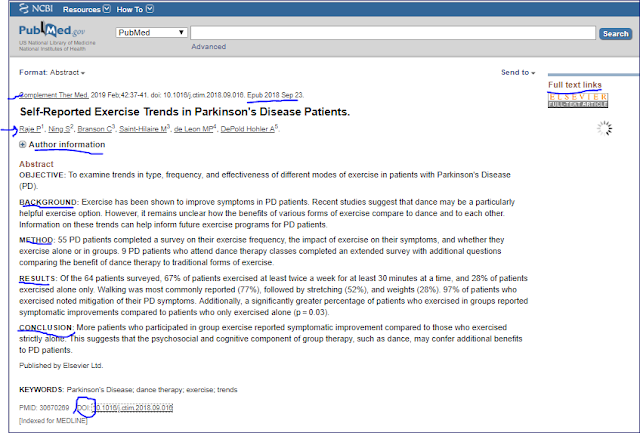
Here's an example of a recent abstract that has been marked to help you identify useful information:
Here are a few things that I do:

Read the Conclusion first (not all abstracts contain these helpful headers, but at least the conclusion will be at the end).  This tells us that:  "More patients who participated in group exercise reported symptomatic improvement compared to those who exercised strictly alone..."  Hm, so pwp are doing better in group exercise.

If I want to know more, I move up to Results.  This tells me some statistics (which I understand some of the time), and more details than the Conclusion. For instance, 97% of those who exercised improved their symptoms.

How was the study done?  How many were involved?  For this, I move up to Method / Methods.  This tells me and number of patients or healthy people were studied, and what action was taken; in this case, it was a survey.

Background will tell briefly about the reasoning or earlier research that lead to this study.

Up at the top are the title and the authors; if I want to know more about who did the research, I can click on + Author Information (in Pubmed, not in the illustration).  At the top is also the journal name and the publication date; often there is an Epub date, date published online, that may be earlier than the "official" publication date. This tells me how recently the work was done.

Often this is enough, but sometimes I want to know more.  For instance, how old were the subjects, or what mix of genders.  Maybe I want to know more about the methodology that was used.  In that case, I need to read the full paper; sometimes I can reach it, either by clicking on Full Text Links (upper right) or on the DOI number (lower left).  Since I've had better luck with the DOI number (Digital Object Identifier), if the Full Text Link doesn't say "Free,"  I click on DOI.  Sometimes all that I can find there is the abstract, but sometimes, with some publishers, there is more.  Some publishers include Highlights, the essential findings, which can be more useful than the abstract for telling about key findings:
Sometimes I can see the full paper, as in this case;  the abstract is at the beginning of the paper, and then the full paper follows.

If I want more, the Discussion section of the full paper often has some of the most interesting material; it's here that researchers often compare their findings to those of different researchers, or reflect on what their results mean.

Sometimes the full paper is behind a Paywall; that means I need to be a subscriber to the journal or a medical/scientific database of these articles, or be willing to pay around $35 to read the paper - which I'm not.  If you think you'll routinely want to read whole papers, cultivate a friend or family member who has access to these articles for their work, perhaps somebody in the scientific or medical field.

I'll be explaining how to evaluate a paper in a future blog post.  For now, post a comment if you have a question, so that I can reply.


Sunday, February 17, 2019

Suppose I want to know the results of a Clinical Trial?


Here’s an ugly truth – even though Clinical Trials need pwp (and sometimes people without Parkinson’s), about 40% of these studies never publish their findings* (this is true for all research there, not just for PD).  Note that NIH and Michael J. Fox Foundation, among others, make publication of results a requirement of funding; wish all funders had such a requirement.

Fortunately, there are several ways to find out the results.  First, make sure the study has finished.  Instead of the status of Recruiting, it will be Completed in ClinicalTrials.gov(See this article for more information about using ClinicalTrials.gov.)

In all cases, you’ll search in Pubmed.gov, a database of biomedical journal research articles from the US and the international research community.  Usually a summary (called an abstract) of the article is available, with a link to the entire article;  sometimes the article itself is free, but sometimes it’s behind a paywall (meaning you must pay the journal to see the article).

You can search Pubmed with keywords, just like Google. Why not just use Google?  Because Google will give you many confusing records you'll need to weed through; Pubmed is easier  For a lot more about usingPubmed, see this article.  

1.  The easiest way to look for a possible journal article is to search for the NCT number (National Clinical Trial) on the Pubmed.gov database, since some researchers refer to the NCT number in their papers. Just enter the NCT number (found throughout the ClinicalTrial.gov record) into the search field at Pubmed.gov as in the example above. 

Here's an example of the start of an abstract that could result from such a search.  You can see the link(s) to the full article on the right.

2 . Entering the NCT number didn’t work?  Put on your detective hat.  From the Clinical Trial record for this study, get the name of the Principal Investigator (scroll down to the bottom of the Tab called Tabular View.) Then look for the title of the study (at the top); you may also have to read the summary paragraph that explains what the study is about.  From these, pull out what you think are the important keywords – for example, name of drug or device or technique used.

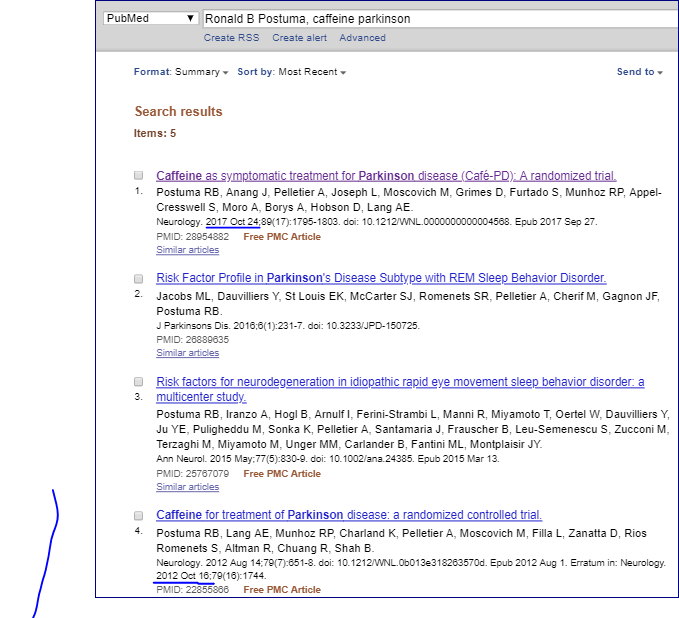
In the Pubmed.gov database, in the search bar put the keywords and the Principal Investigator’s name.  You may also need to add the term Parkinson.  See the example below:


There may be nothing, or multiple articles.  If the title doesn’t tell you enough to decide which is the right article, compare the Completion Date from ClinicalTrial.gov with the publication date of the articles; the publication date is usually at or later than the Completion Date; this was done in the example shown above, choosing the 2017 article because it comes a few months after completion.

3.  If none of the papers deal with the clinical trial, there's one more place. Often you'll find an email address associated with the Principal Investigator in the Clinical Trial database, so you could email this person to ask about publication of results.  There may be a paper that you didn’t find, or the paper may be in the process of being published, so you don't want to assume they didn't publish. Here’s an example email:  “I’ve been looking for the paper that describes the results of NCT12345678. Title of Study.  Can you help?” If they have a paper, they can provide the link.  If they don’t have a paper, you may have managed to make them feel a bit embarrassed, all while staying completely polite yourself, and not risking embarrassment.  (Take the high road.)   

4. By the way, if somebody gives you a DOI number (used in electronic publishing), go to dx.doi.org, enter the number in the search box, and you’ll go right to the summary and/or article. (Google will give you confusing choices.)

5.  If none of these work, you've struck one of the 40%.  Studies that use US government money are required to publish their results.  Shouldn't funders from companies, foundations, and universities require the same?

*Wyant, Kara J., Yasuda, Erica, Kotagal, Vikas. “The 10‐Year Landscape of United States‐Registered Parkinson Disease Clinical Trials: 2007–2016.” Movement Disorders, Wiley InterScience, 4 Oct. 2018,  onlinelibrary.wiley.com/doi/abs/10.1002/mdc3.12665.

Great tools to use during the Pandemic

Some organizations have stepped up for pwp who have lost socialization, and usually exercise programs and support groups.  Even for those ex...